Mer/Documentation/Desktop layout: Difference between revisions
From Maemo Wiki
Jump to navigationJump to search
imported>stskeeps |
imported>stskeeps |
||
| Line 7: | Line 7: | ||
*Height: 52px, Width: As wide as the screen | *Height: 52px, Width: As wide as the screen | ||
=== First element: Application menu button === | ==== First element: Application menu button ==== | ||
*Example: http://www.daimi.au.dk/~cvm/mer-appmenu.png | *Example: http://www.daimi.au.dk/~cvm/mer-appmenu.png | ||
| Line 13: | Line 13: | ||
*Description: Mer logo or proper icon for application menu. Upon press, it highlights and shows application menu. | *Description: Mer logo or proper icon for application menu. Upon press, it highlights and shows application menu. | ||
=== Second element: Menu button === | ==== Second element: Menu button ==== | ||
*Example: http://www.daimi.au.dk/~cvm/mer-menubutton.png | *Example: http://www.daimi.au.dk/~cvm/mer-menubutton.png | ||
| Line 19: | Line 19: | ||
*Description: The former Hildon title bar, but since we don't have titlebars anymore, we have a menu button | *Description: The former Hildon title bar, but since we don't have titlebars anymore, we have a menu button | ||
=== Third element: Quick task switcher === | ==== Third element: Quick task switcher ==== | ||
*Example: http://www.daimi.au.dk/~cvm/mer-hmm.png | *Example: http://www.daimi.au.dk/~cvm/mer-hmm.png | ||
| Line 25: | Line 25: | ||
*Description: Shows current application and X others | *Description: Shows current application and X others | ||
=== Fourth element: Status bar === | ==== Fourth element: Status bar ==== | ||
*Example: http://www.daimi.au.dk/~cvm/mer-hmm.png | *Example: http://www.daimi.au.dk/~cvm/mer-hmm.png | ||
| Line 31: | Line 31: | ||
*Description: Shows current status bar area | *Description: Shows current status bar area | ||
=== Fifth element: The magic X === | ==== Fifth element: The magic X ==== | ||
*Example: http://www.daimi.au.dk/~cvm/mer-xmenu.png | *Example: http://www.daimi.au.dk/~cvm/mer-xmenu.png | ||
*Width: 52px | *Width: 52px | ||
*Description: The former >>, the switcher menu | *Description: The former >>, the switcher menu | ||
Revision as of 16:18, 8 March 2009
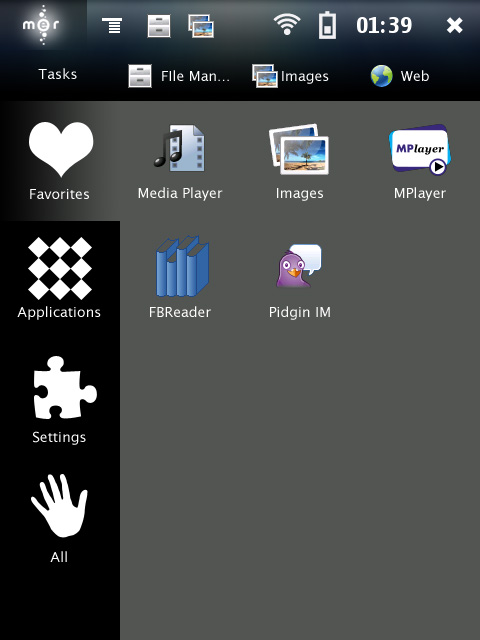
Layout for Hildon Desktop on Mer
General outline: here
Marquee
- Height: 52px, Width: As wide as the screen
First element: Application menu button
- Example: http://www.daimi.au.dk/~cvm/mer-appmenu.png
- Width: 86px
- Description: Mer logo or proper icon for application menu. Upon press, it highlights and shows application menu.
Second element: Menu button
- Example: http://www.daimi.au.dk/~cvm/mer-menubutton.png
- Width: 52px
- Description: The former Hildon title bar, but since we don't have titlebars anymore, we have a menu button
Third element: Quick task switcher
- Example: http://www.daimi.au.dk/~cvm/mer-hmm.png
- Width: X items of 42px, X > 0, icons 32x32px
- Description: Shows current application and X others
Fourth element: Status bar
- Example: http://www.daimi.au.dk/~cvm/mer-hmm.png
- Width: Y items of 42px, Y > 0, icons 32x32px
- Description: Shows current status bar area
Fifth element: The magic X
- Example: http://www.daimi.au.dk/~cvm/mer-xmenu.png
- Width: 52px
- Description: The former >>, the switcher menu