Mer/Documentation/Desktop layout: Difference between revisions
From Maemo Wiki
Jump to navigationJump to search
imported>stskeeps No edit summary |
imported>stskeeps No edit summary |
||
| Line 16: | Line 16: | ||
*Position: Top of screen, disappears in full screen. | *Position: Top of screen, disappears in full screen. | ||
Background: marquee_background.png, 18x52, repeating | |||
==== First element: Application menu button ==== | ==== First element: Application menu button ==== | ||
| Line 43: | Line 25: | ||
*Width: 90px, icon: 48x48, but should be scalable | *Width: 90px, icon: 48x48, but should be scalable | ||
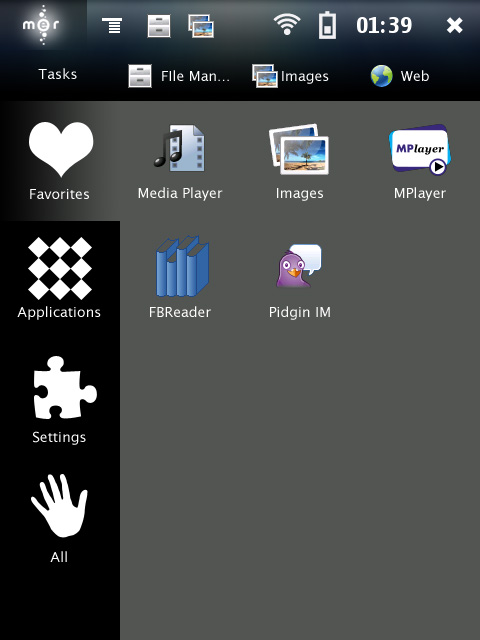
*Description: Mer logo or proper icon for application menu. Upon press, it highlights and shows application menu. | *Description: Mer logo or proper icon for application menu. Upon press, it highlights and shows application menu. | ||
*Widget icon: qgn_grid_tasknavigator_others , http://s51.radikal.ru/i133/0903/7d/f77074ef093e.png , | *Widget icon: qgn_grid_tasknavigator_others , http://s51.radikal.ru/i133/0903/7d/f77074ef093e.png , part of theme template | ||
==== Second element: Menu button ==== | ==== Second element: Menu button ==== | ||
| Line 53: | Line 35: | ||
*Description: The former Hildon title bar, but since we don't have titlebars anymore, we have a menu button | *Description: The former Hildon title bar, but since we don't have titlebars anymore, we have a menu button | ||
*Implemented by: marquee-plugins, drop-down-menu.c | *Implemented by: marquee-plugins, drop-down-menu.c | ||
*Icon name: qgn_mer_menubutton , http://s50.radikal.ru/i129/0903/ca/21d1a72a64f5.png | *Icon name: qgn_mer_menubutton , http://s50.radikal.ru/i129/0903/ca/21d1a72a64f5.png, part of theme template | ||
==== Third element: Quick task switcher ==== | ==== Third element: Quick task switcher ==== | ||
Revision as of 22:05, 21 March 2009
Layout for Hildon Desktop on Mer
General outline: here
Pre-artwork implementation: http://www.daimi.au.dk/~cvm/mer-ui-implemented.png
New-artwork ideas: http://i041.radikal.ru/0903/5f/5cf0986d63e7.jpg
Touch pixel sizes from https://help.ubuntu.com/community/UMEGuide/DesigningForFingerUIs
Marquee
Implemented in h-d, r1145
- Height: 52px, Width: As wide as the screen
- Position: Top of screen, disappears in full screen.
Background: marquee_background.png, 18x52, repeating
First element: Application menu button
Implemented, h-d r1147
- Example: http://www.daimi.au.dk/~cvm/mer-appmenu.png
- Width: 90px, icon: 48x48, but should be scalable
- Description: Mer logo or proper icon for application menu. Upon press, it highlights and shows application menu.
- Widget icon: qgn_grid_tasknavigator_others , http://s51.radikal.ru/i133/0903/7d/f77074ef093e.png , part of theme template
Second element: Menu button
Implemented in lp:~mer-committers/m-r/marquee-plugins r2
- Example: http://www.daimi.au.dk/~cvm/mer-menubutton.png
- Width: 90px, icon: 48x48
- Description: The former Hildon title bar, but since we don't have titlebars anymore, we have a menu button
- Implemented by: marquee-plugins, drop-down-menu.c
- Icon name: qgn_mer_menubutton , http://s50.radikal.ru/i129/0903/ca/21d1a72a64f5.png, part of theme template
Third element: Quick task switcher
Implemented in h-d r1148
- Example: http://www.daimi.au.dk/~cvm/mer-hmm.png
- Width: X items of 42px, X > 0, icons 32x32px
- Description: Shows current application and X others
Fourth element: Status bar
Implemented in h-d, r1149
- Example: http://www.daimi.au.dk/~cvm/mer-hmm.png
- Width: Y items of 42px, Y > 0, icons 32x32px
- Description: Shows current status bar area
Fifth element: The magic X
Implemented in h-d, r1150
- Example: http://www.daimi.au.dk/~cvm/mer-xmenu.png
- Width: 90px, Z > 52, 48x48 px icon
- Description: The former >>, the switcher menu, shows up when number of applications active > 0
- Icon: qgn_list_tasknavigator_appswitcher , http://s51.radikal.ru/i134/0903/84/e7c91bfbf9ce.png
Icons for closing within this: http://i013.radikal.ru/0903/e1/5c85d73dcb42.png